

Workflows are saved, reusable tasks that run directly in Inven — one-pagers, buyer lists, slides, and more. Save how your team works once, and everyone runs it the same way. No MCP or setup required.
Meet Workflows: the work you repeat, run the same way every time
Every M&A project starts with the same work: one-pagers, buyer lists, target screening, competitor benchmarking, valuation comps. The steps rarely change, but most teams rebuild them from scratch every time.
Inven Workflows capture how your team does a recurring task: the steps, the data points, and the output template. Save it once, and it runs the same way every time after, for everyone.
See how it works in this video:
What's inside a Workflow?
Every Inven Workflow has two parts: instructions and the output template.
The instructions tell Inven what to do and how to do it — what data to pull, how to structure the analysis, and what the final deliverable should contain.
They also lock in the conventions your team cares about: which figures to use, how to format them, and what to do when data is missing. Set those once, and you stop repeating them on every project.
The output template applies to workflows that produce a formatted deliverable, like a slide or spreadsheet. Upload your firm's PowerPoint template or an example Excel file, and every output comes out in the right layout and style.
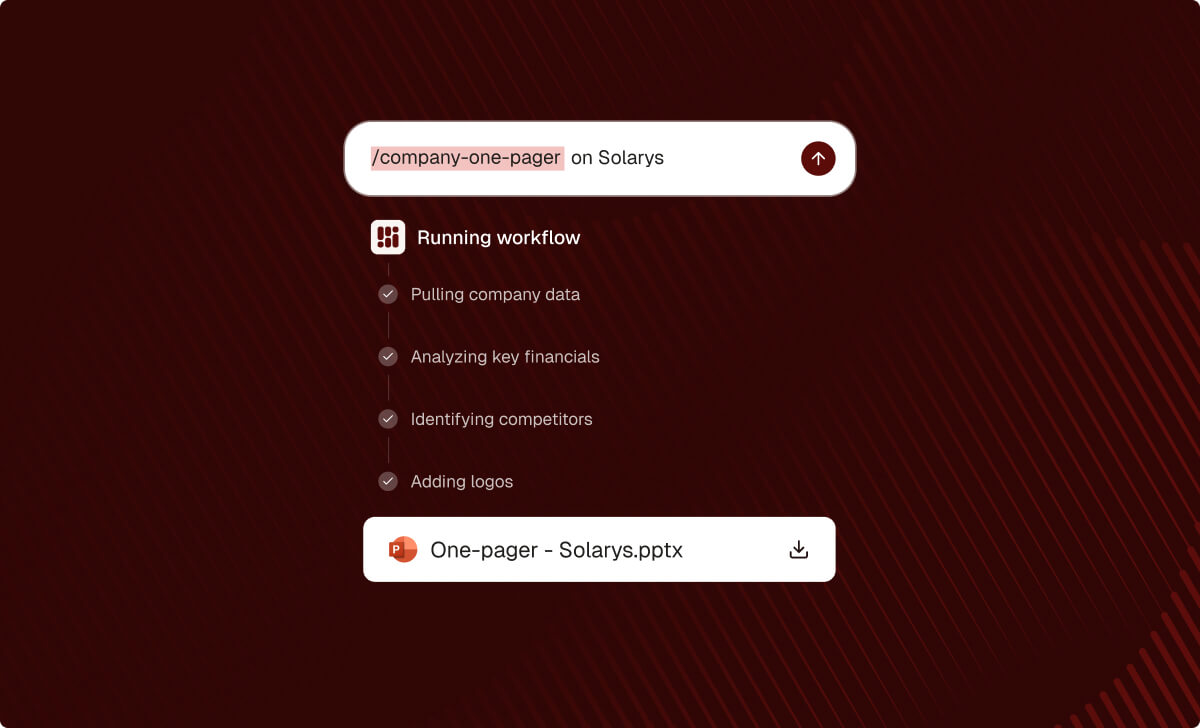
What tasks can Workflows speed up?
Workflows are designed to speed up recurring tasks that come up on every deal and project, such as:
- Company overview slides like one-pagers
- Target lists and buyer lists
- Competitor overview and peer benchmarking
- Comparables and precedent transactions
- Market sizing and growth
Start with our library of ready-to-use workflows, or build your own around your firm's ways of working.
How do M&A teams use Inven Workflows?
Workflows lock in the process and output for recurring work, so it comes out right every time, across the entire firm.
- In private equity, use Workflows to screen the market against investment criteria, maintain watchlists that track growth, ownership and management changes, and pull company profiles and market views on tracked targets.
- In investment banks, use them to build the buyer or target long list, screen listed peers and precedent deals for the comp set, and produce the company, market and competitor content that goes into pitches, teasers and CIMs.
- In corporate development, use them to map the acquisition universe against strategic logic, qualify targets, monitor the market continuously, and pull company profiles.
- In strategy consulting, use them to create a company overview, size and segment the market, and build the competitive landscape.
How does a Workflow become firm-wide?
Sharing is the point. A Workflow one analyst creates saves them time. A Workflow shared with the whole firm changes how everyone works.
Share any Workflow with your entire organization, or with selected team members. From then on, how your best people work becomes how everyone works — the same steps, the same standards, whoever picks up the project.
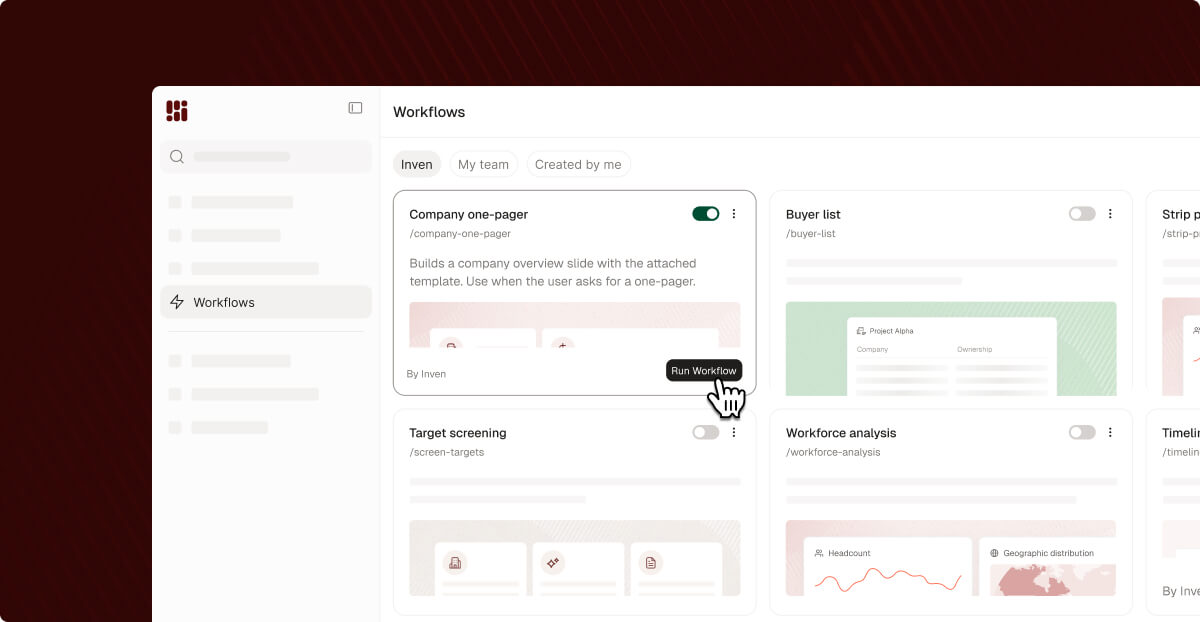
How to get started with Workflows
Try a ready-made workflow
- Browse the workflow library. Open Workflows from the sidebar to view available workflows.
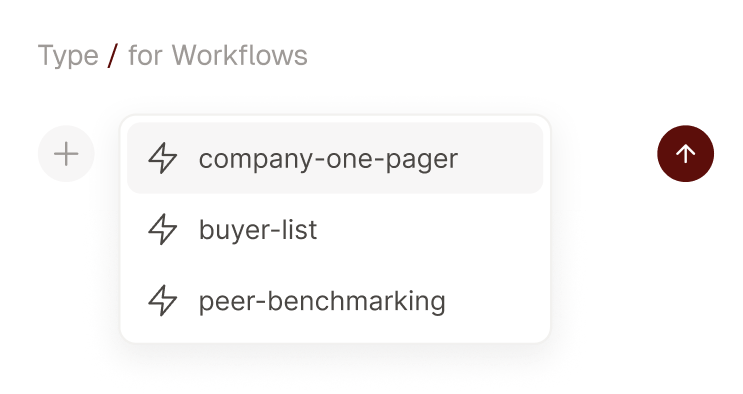
- Run a workflow: Type / , select a workflow, and add your task details.
- Tweak to fit: Duplicate one of Inven's workflows, then prompt to edit the steps or swap in your firm's own template.
Create your own workflow
Got a process you run over and over? Turn it into a workflow.
- Create a workflow in Inven. Prompt e.g. "I want to create a workflow for building a buyer list." Inven guides you through it. Or run a task from start to finish in the chat, then write "Make this into a workflow."
- Share it with your team. Choose to share the workflow with your entire organization, or selected team members.
Work with our team to build custom workflows for your firm
Our team can work with your firm to build custom workflows.
- Tell us what you repeat. The tasks that take the most time on every project, or where output varies most between analysts.
- Share how your firm does them. Your templates, conventions, and analytical standards — the details you'd otherwise re-explain to every new analyst.
- We build and refine it with you. We set it up, test it against a live project, and iterate until the output matches what your team would have produced by hand.
- Roll it out. Share it across the firm, so your method runs on every project.
Reach out to your Inven contact to get started.
Common questions
What is a Workflow?
A saved, reusable process in Inven that runs the same steps every time — pulling the right data, applying your team's conventions, and creating deliverables in a consistent format.
Who can use a saved Workflow?
Whoever you share it with. Click Share to make a Workflow available to your whole organization, or to specific team members.
Do I need MCP or Claude to use Workflows?
No. Workflows run directly in Inven, with no separate setup required.
Can I build a custom Workflow?
Yes, build it yourself or in collaboration with our experts.
Build it yourself: run a task once in Inven, then ask to save it as a Workflow. Or describe the task you want to create a worflow for, and Inven will guide you through it, iterating on the steps and output before you save.
Build it with us: For the tasks specific to how your firm works, our team sets the Workflow up with you, using your templates, conventions, and analytical standards, then tests and refines it against a live project. Talk to your Inven contact to get started.
Get started with Workflows
Bring the tasks and deliverables you do on every project. We'll show what Inven can deliver with Workflows. Book a demo.
Stop rebuilding the same work
Save a workflow once. Your whole firm runs it the same way, every time.
Join 1,000+ M&A teams using Inven analyze entire markets and build polished deliverables — backed by private market data.